What to set in the slicer
They start from the stock Orca Slicer profiles for the Bambu Lab A1: “0.08mm Extra Fine” for the master model and “0.20mm Standard” for the jacket, formwork, base and clamps. The table lists only what we change; leave everything else as it is. Speeds are tuned for the A1.
| Setting | The master | Jacket and the rest | Why |
|---|---|---|---|
| Quality | |||
| Layer height | 0.08 mm | 0.20 mm | Every cast copies the master's layers; nobody will see them on a jacket or a clamp |
| Seam position | Aligned back | Aligned | The seam is a scar every cast inherits: on a master it goes to the back |
| Precise Z height | On | On | The part comes out exactly as tall as the model — level notches and the halves' joints line up |
| Walls and shells | |||
| Wall loops | 3 | 3 | The pour seeps through wherever perimeters have not fused to each other, and denser infill does not fix that |
| Wall generator | Arachne | Arachne | A variable-width line fills thin spots — rims, keys, clamp rails — with no gaps between perimeters |
| Top shell layers | 13 | 7 | A lid about a millimetre thick does not sag over the infill, and the infill pattern does not show through |
| Infill | |||
| Sparse infill density | 15 % | 10 % | The wall is held by the perimeters; dense infill is a spool of filament and hours of printing for nothing |
| Sparse infill pattern | Rectilinear | Grid | The pattern does not show under the perimeters; rectilinear and grid print faster than crosshatch |
| Reduce infill retraction | Off | Off | Without retraction the nozzle oozes over the infill and draws strings; on a master they reach the surface |
| Speed | |||
| Outer wall speed | 90 mm/s | 120 mm/s | The show face is printed slowly: at stock speed it ripples |
| Inner wall speed | 120 mm/s | 200 mm/s | The stock A1 profile is built for speed, while a mold needs a surface: inner walls slow down too |
| Sparse infill speed | 200 mm/s | 200 mm/s | Same reason: infill runs at the inner-wall speed |
| Support | |||
| Enable support | On | On | A master rarely stands with no overhang at all, and an unsupported sagging edge ends up in the cast |
| Support type | Tree | Tree | A tree touches the model at points and leaves a smaller mark than normal support |
| Tree style | Strong | Slim | A master prints long and tall — the branches must not bend; slim ones are enough for tooling |
| Overhang threshold | As stock | 40° | Tooling only needs support under steep overhangs |
| On build plate only | As stock | On | Support inside a jacket or formwork cannot be reached afterwards |
| Top interface layers | 5 | As stock | A thick interface leaves a flat pad under the master's surface |
| Bottom interface layers | 5 | As stock | The bottom interface sits on the model, not the bed: its mark on the master sands off too |
| Interface line spacing | 0 mm | 0 mm | A solid interface leaves a flat pad rather than a comb: the mark sands off in a minute |
| Support Z distance | 0.08 mm | 0.15 mm | A one-layer gap: the support comes off and the surface above it does not sag |
| Brim | |||
| Brim type | Outer only | Outer only | A tall narrow part without a brim pops off the bed halfway through; outer only so the brim does not land in cavities |
| Brim width | 5 mm | 3 mm | A master is taller and narrower and needs a wider brim; tooling stands on a broad base |
| Brim-object gap | 0.05 mm | 0.06 mm | The brim grips the part harder but still snaps off by hand |
For every part
| Setting | Value | Why |
|---|---|---|
| Orientation | Mating face down, show face as a side wall | The flattest face on a print is the one that sat on the bed, so that is the one that should mate. The top comes out rippled by ironing, so the show face never goes up |
| Fit clearance | 0.20–0.25 mm | A printer prints slightly oversize, so a key printed to exact size will not go in — print one as a test |
| Relief depth | 0.6 mm and up | Relief finer than the layer height vanishes in print |
| Perimeters under relief | Two at least | The first perimeter is spent on the pattern itself, the second holds the wall |
Filament
| Setting | Value | Why |
|---|---|---|
| Material | PETG for wax and anything hot, PLA for plaster, concrete and resin | PLA starts to soften at about 60 °C, below the temperature wax is poured at |
| Temperature | Middle of the range on the spool, fine-tuned with a temperature tower | Too hot draws strings and leaves blobs on the master, too cold fuses perimeters poorly — and the wall leaks |
| Flow rate | Calibrate with Orca's built-in test before printing a mold | Flow drives both the fit clearance and the wall's watertightness: over-extrusion jams keys, under-extrusion leaves gaps |
| Pressure Advance | Calibrate with Orca's built-in test before printing a mold | Uncalibrated, corners blob and line starts under-extrude — on keys and mold rims that means gaps |
| Drying | PETG always, PLA if the spool sat open | Wet filament bubbles: pockmarks on a master, pores in a mold wall that the pour escapes through |
| One spool per set | Mold halves and keys from the same filament | Different spools lay different line widths, and a fit clearance tuned on one will not match on another |
How to orient the part
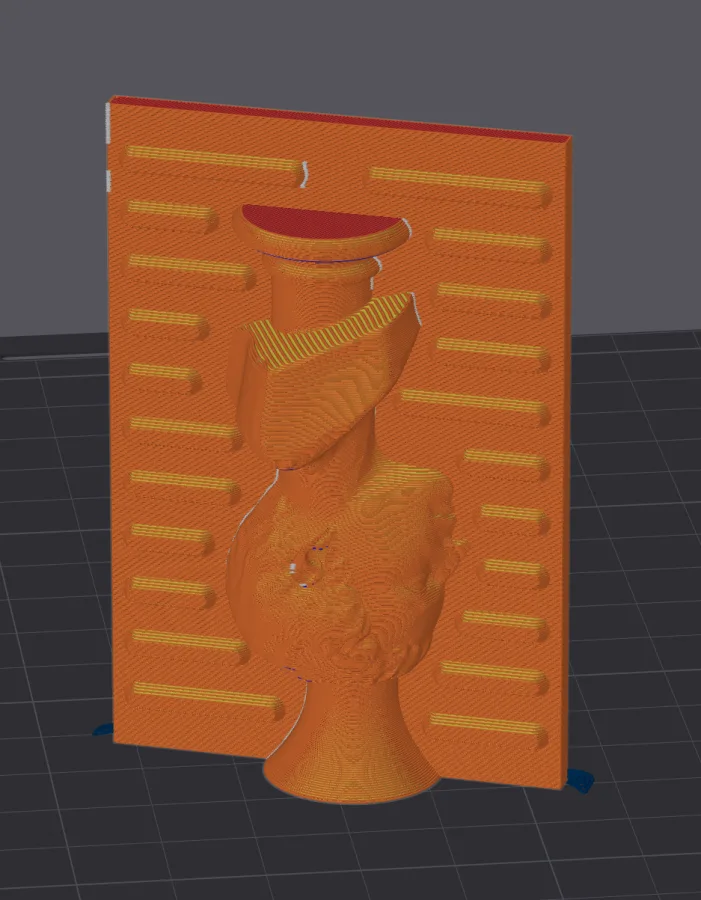
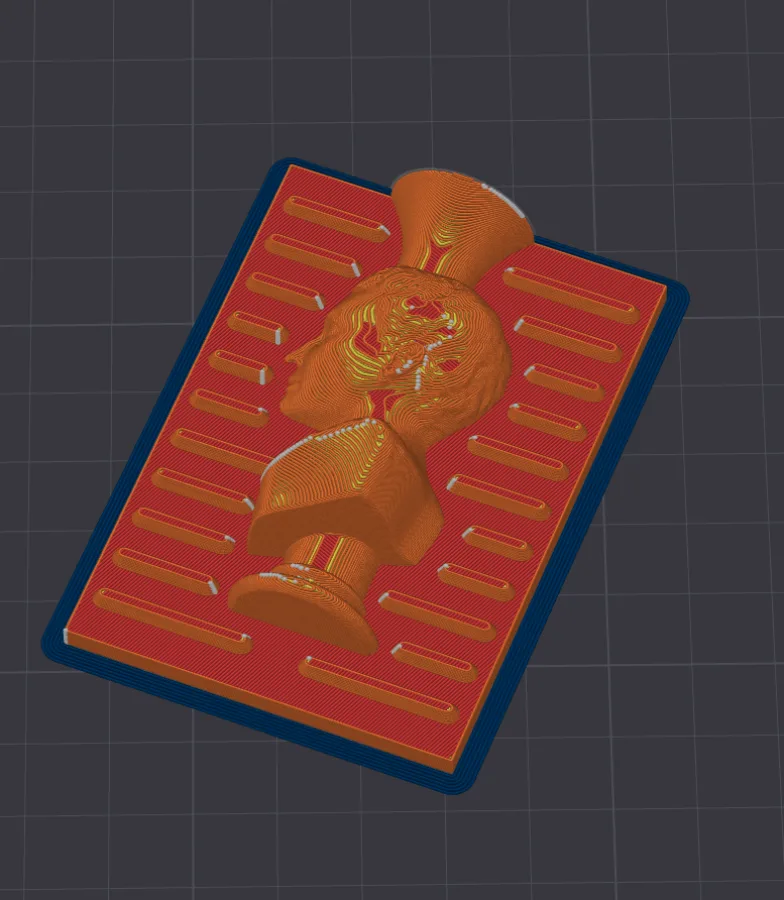
Print the master standing, not lying flat The show face should print as a wall: layers and ironing marks are visible on a top surface, and the mold copies them along with the relief.
Symptom, and what to change
- Print layers show on the cast
- The master was lying flat, so its show face printed as a top surface. Stand it up and print at 0.08 mm layers.
- The pour weeps out along the seam
- Fewer than three perimeters, or the parting face was not on the bed: lay the mold parting face down.
- Support marks on a working surface
- The support interface is sparse: make it solid, zero line spacing, 5 top and bottom layers, a one-layer Z gap.
- The mold bulged or the wall cracked
- The wall is thinner than 2.5 mm, or PLA met a hot pour. Wall 2.5–3.5 mm, from 4 mm for concrete, PETG for anything hot.
- The halves do not line up
- The key was printed to exact size. Fit clearance 0.20–0.25 mm, and one test part before the whole set.
The material and process of a specific mold live on its generator page. All generators